Regression
The smile.regression package is a complete suite of supervised regressors for predicting a continuous response. Every algorithm exposes static fit(…) factories, implements Regression<T>, and is serializable.
This page covers the core abstractions (including nested Options / Properties), synthetic 1-D / 2-D helpers plus Abalone, an algorithm selection guide, then each family with runnable Java / Scala / Kotlin playgrounds. Expected outputs cite unit-test metrics where available; plot demos open a Swing window.
Core Abstractions
Regression<T> extends ToDoubleFunction<T>: predict(x) returns a scalar, with batch overloads for arrays, lists, and datasets. Optional online learning uses update(x, y). Probe that capability with online() (not isOnline()) before calling update — the default implementation reports false for batch-only models.
// Works for any smile.regression.Regression<T>
double yhat = model.predict(sample);

if (model.online()) {
    model.update(newSample, newTarget); // incremental learning
}
prediction / optional online update
val yhat = model.predict(sample)

if (model.online()) {
  model.update(newSample, newTarget)
}
prediction / optional online update
val yhat = model.predict(sample)

if (model.online()) {
    model.update(newSample, newTarget)
}
prediction / optional online update
DataFrameRegression
Tree ensembles and linear Formula fits implement DataFrameRegression (extends Regression<Tuple>). Train with a Formula plus a DataFrame, then predict named-column rows. DataFrameRegression.of(…) wraps any Regression<double[]> so formula feature extraction is applied automatically.
import smile.data.formula.Formula
import smile.regression.RandomForest

Formula formula = Formula.lhs("rings");
RandomForest model = RandomForest.fit(formula, train);
double[] yhat = model.predict(test);
import smile.data.formula.Formula
import smile.regression._
val formula = Formula.lhs("rings")
val model = randomForest(formula, train)
val yhat = model.predict(test)import smile.data.formula.Formula
import smile.regression.*
val formula = Formula.lhs("rings")
val model = randomForest(formula, train)
val yhat = model.predict(test)LinearModel
OLS, Ridge, LASSO, and ElasticNet return LinearModel: coefficients (with optional standard errors / t-tests), residual error, RSquared() / adjustedRSquared(), and — when fitted with recursive = true — Sherman–Morrison–Woodbury update for recursive least squares (RLS).
import smile.regression.OLS
import smile.datasets.Longley

var longley = new Longley()
var model = OLS.fit(longley.formula(), longley.data())
model.coefficients()
model.RSquared()          // ≈ 0.9926 on Longley
if (model.online())
    model.update(newRow)  // RLS when recursive=true
R² ≈ 0.9926 (Longley OLS)
import smile.regression._
import smile.datasets.Longley

val longley = new Longley()
val model = lm(longley.formula, longley.data)
model.coefficients
model.RSquared()
R² ≈ 0.9926 (Longley OLS)
import smile.regression.*
import smile.datasets.Longley

val longley = Longley()
val model = lm(longley.formula(), longley.data())
model.coefficients()
model.RSquared()
R² ≈ 0.9926 (Longley OLS)
Options and Properties
Most algorithms expose a nested Options record for strongly typed hyperparameters (for example RandomForest.Options, SVM.Options, OLS.Options). Construct an Options instance and pass it to fit, or load the same knobs from a configuration file via java.util.Properties. Each Options type supports toProperties() and Options.of(props) for round-trips. Property keys use underscores (e.g. smile.random_forest.trees); algorithm sections below list the field name and the corresponding full property key in a description list.
import java.util.Properties
import smile.regression.RandomForest
import smile.data.formula.Formula

// Strongly typed Options
var options = new RandomForest.Options(200)
RandomForest model = RandomForest.fit(formula, data, options)

// Or configuration-file style Properties
Properties params = new Properties()
params.setProperty("smile.random_forest.trees", "200")
params.setProperty("smile.random_forest.max_depth", "10")
model = RandomForest.fit(formula, data, params)

// Round-trip
Properties props = options.toProperties()
var again = RandomForest.Options.of(props)
import java.util.Properties
import smile.regression._
val options = new RandomForest.Options(200)
val model = RandomForest.fit(formula, data, options)
val params = new Properties()
params.setProperty("smile.random_forest.trees", "200")
params.setProperty("smile.random_forest.max_depth", "10")
val model2 = RandomForest.fit(formula, data, params)
val props = options.toProperties
val again = RandomForest.Options.of(props)import java.util.Properties
import smile.regression.*
val options = RandomForest.Options(200)
var model = RandomForest.fit(formula, data, options)
val params = Properties()
params.setProperty("smile.random_forest.trees", "200")
params.setProperty("smile.random_forest.max_depth", "10")
model = RandomForest.fit(formula, data, params)
val props = options.toProperties()
val again = RandomForest.Options.of(props)Datasets and Visualization
Examples reuse seeded synthetic generators for 1-D / 2-D function plots and Abalone for high-dimensional Formula metrics. Call MathEx.setSeed(19650218) once so plots and RMSE figures match the unit tests. Helpers below are defined once; later demos call them (do not paste helper bodies again). Use compare1d to overlay OLS with several hyperparameter settings on the same 1-D sinusoid.
Synthetic generators
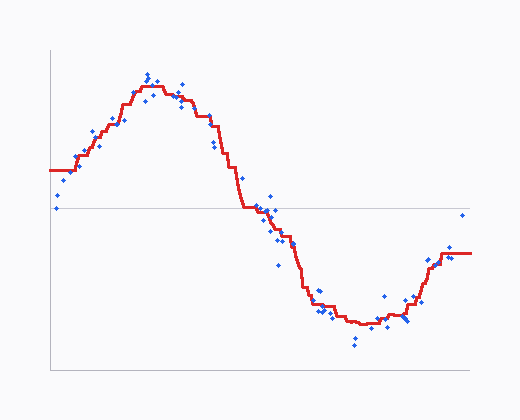
generate1d(n) places x on [0, 1] with y = sin(2πx) + 0.1·noise. generate2d(n) samples x on [-1, 1]² with y = x₀ − x₁² + 0.1·noise. Wrap arrays into a DataFrame with DataFrame.of + DoubleVector and Formula.lhs("y") for tree / OLS demos.
import smile.data.DataFrame;
import smile.data.formula.Formula;
import smile.data.vector.DoubleVector;
import smile.math.MathEx;

MathEx.setSeed(19650218);

/** 1-D: x on [0,1], y = sin(2πx) + 0.1·noise. */
double[][] generate1d(int n) {
    double[][] x = new double[n][1];
    for (int i = 0; i < n; i++) x[i][0] = i / (n - 1.0);
    return x;
}
double[] response1d(double[][] x) {
    double[] y = new double[x.length];
    for (int i = 0; i < x.length; i++)
        y[i] = Math.sin(2 * Math.PI * x[i][0]) + 0.1 * MathEx.random();
    return y;
}

/** 2-D: x on [-1,1]², y = x0 − x1² + 0.1·noise. */
double[][] generate2d(int n) {
    double[][] x = new double[n][2];
    for (int i = 0; i < n; i++) {
        x[i][0] = 2 * MathEx.random() - 1;
        x[i][1] = 2 * MathEx.random() - 1;
    }
    return x;
}
double[] response2d(double[][] x) {
    double[] y = new double[x.length];
    for (int i = 0; i < x.length; i++)
        y[i] = x[i][0] - x[i][1] * x[i][1] + 0.1 * MathEx.random();
    return y;
}

DataFrame toFrame1d(double[][] x, double[] y) {
    return DataFrame.of(x, "x").add(new DoubleVector("y", y));
}
DataFrame toFrame2d(double[][] x, double[] y) {
    return DataFrame.of(x, "x1", "x2").add(new DoubleVector("y", y));
}
Formula formula = Formula.lhs("y");
import smile.data.DataFrame
import smile.data.formula.Formula
import smile.data.vector.DoubleVector
import smile.math.MathEx
MathEx.setSeed(19650218)
def generate1d(n: Int): Array[Array[Double]] =
Array.tabulate(n)(i => Array(i / (n - 1.0)))
def response1d(x: Array[Array[Double]]): Array[Double] =
x.map(xi => Math.sin(2 * Math.PI * xi(0)) + 0.1 * MathEx.random())
def generate2d(n: Int): Array[Array[Double]] =
Array.fill(n)(Array(2 * MathEx.random() - 1, 2 * MathEx.random() - 1))
def response2d(x: Array[Array[Double]]): Array[Double] =
x.map(xi => xi(0) - xi(1) * xi(1) + 0.1 * MathEx.random())
def toFrame1d(x: Array[Array[Double]], y: Array[Double]) =
DataFrame.of(x, "x").add(new DoubleVector("y", y))
def toFrame2d(x: Array[Array[Double]], y: Array[Double]) =
DataFrame.of(x, "x1", "x2").add(new DoubleVector("y", y))
val formula = Formula.lhs("y")import smile.data.DataFrame
import smile.data.formula.Formula
import smile.data.vector.DoubleVector
import smile.math.MathEx
import kotlin.math.PI
import kotlin.math.sin
MathEx.setSeed(19650218)
fun generate1d(n: Int): Array<DoubleArray> =
Array(n) { i -> doubleArrayOf(i / (n - 1.0)) }
fun response1d(x: Array<DoubleArray>): DoubleArray =
DoubleArray(x.size) { i -> sin(2 * PI * x[i][0]) + 0.1 * MathEx.random() }
fun generate2d(n: Int): Array<DoubleArray> =
Array(n) { doubleArrayOf(2 * MathEx.random() - 1, 2 * MathEx.random() - 1) }
fun response2d(x: Array<DoubleArray>): DoubleArray =
DoubleArray(x.size) { i -> x[i][0] - x[i][1] * x[i][1] + 0.1 * MathEx.random() }
fun toFrame1d(x: Array<DoubleArray>, y: DoubleArray) =
DataFrame.of(x, "x").add(DoubleVector("y", y))
fun toFrame2d(x: Array<DoubleArray>, y: DoubleArray) =
DataFrame.of(x, "x1", "x2").add(DoubleVector("y", y))
val formula = Formula.lhs("y")visualize1d
Two overloads: Regression<double[]> (scatter + dense LinePlot), and DataFrameRegression + training frame + x-column name (builds a grid DataFrame for the curve).
import smile.data.DataFrame;
import smile.math.MathEx;
import smile.plot.swing.*;
import smile.regression.DataFrameRegression;
import smile.regression.Regression;

/** Scatter of training points + line of dense predictions (array model). */
Figure visualize1d(Regression<double[]> model, double[][] x, double[] y) {
    int n = x.length;
    double[][] points = new double[n][2];
    for (int i = 0; i < n; i++) {
        points[i][0] = x[i][0];
        points[i][1] = y[i];
    }
    double lo = MathEx.colMin(x)[0], hi = MathEx.colMax(x)[0];
    int m = 100;
    double step = (hi - lo) / (m - 1);
    double[][] curve = new double[m][2];
    double[][] grid = new double[m][1];
    for (int i = 0; i < m; i++) {
        grid[i][0] = lo + i * step;
        curve[i][0] = grid[i][0];
        curve[i][1] = model.predict(grid[i]);
    }
    var figure = ScatterPlot.of(points, 'o').figure();
    figure.add(LinePlot.of(curve));
    return figure;
}

/** Same for Formula / DataFrameRegression models (grid built as a DataFrame). */
Figure visualize1d(DataFrameRegression model, DataFrame train, String xCol) {
    double[] xv = train.column(xCol).toDoubleArray();
    double[] yv = model.formula().y(train).toDoubleArray();
    int n = xv.length;
    double[][] points = new double[n][2];
    for (int i = 0; i < n; i++) {
        points[i][0] = xv[i];
        points[i][1] = yv[i];
    }
    double lo = MathEx.min(xv), hi = MathEx.max(xv);
    int m = 100;
    double step = (hi - lo) / (m - 1);
    double[][] gridX = new double[m][1];
    for (int i = 0; i < m; i++) gridX[i][0] = lo + i * step;
    double[] pred = model.predict(DataFrame.of(gridX, xCol));
    double[][] curve = new double[m][2];
    for (int i = 0; i < m; i++) {
        curve[i][0] = gridX[i][0];
        curve[i][1] = pred[i];
    }
    var figure = ScatterPlot.of(points, 'o').figure();
    figure.add(LinePlot.of(curve));
    return figure;
}
Figure (call .show() to open)
import smile.data.DataFrame
import smile.math.MathEx
import smile.plot.swing._
import smile.regression.{DataFrameRegression, Regression}

def visualize1d(model: Regression[Array[Double]], x: Array[Array[Double]], y: Array[Double]): Figure = {
  val points = x.zip(y).map { case (xi, yi) => Array(xi(0), yi) }
  val lo = MathEx.colMin(x)(0); val hi = MathEx.colMax(x)(0)
  val m = 100; val step = (hi - lo) / (m - 1)
  val grid = Array.tabulate(m)(i => Array(lo + i * step))
  val curve = grid.map(g => Array(g(0), model.predict(g)))
  val figure = ScatterPlot.of(points, 'o').figure()
  figure.add(LinePlot.of(curve))
  figure
}

def visualize1d(model: DataFrameRegression, train: DataFrame, xCol: String): Figure = {
  val xv = train.column(xCol).toDoubleArray
  val yv = model.formula.y(train).toDoubleArray
  val points = xv.zip(yv).map { case (a, b) => Array(a, b) }
  val lo = MathEx.min(xv); val hi = MathEx.max(xv)
  val m = 100; val step = (hi - lo) / (m - 1)
  val gridX = Array.tabulate(m)(i => Array(lo + i * step))
  val pred = model.predict(DataFrame.of(gridX, xCol))
  val curve = gridX.zip(pred).map { case (g, p) => Array(g(0), p) }
  val figure = ScatterPlot.of(points, 'o').figure()
  figure.add(LinePlot.of(curve))
  figure
}
Figure (call .show() to open)
import smile.data.DataFrame
import smile.math.MathEx
import smile.plot.swing.*
import smile.regression.DataFrameRegression
import smile.regression.Regression

fun visualize1d(model: Regression<DoubleArray>, x: Array<DoubleArray>, y: DoubleArray): Figure {
    val points = Array(x.size) { i -> doubleArrayOf(x[i][0], y[i]) }
    val lo = MathEx.colMin(x)[0]; val hi = MathEx.colMax(x)[0]
    val m = 100; val step = (hi - lo) / (m - 1)
    val grid = Array(m) { i -> doubleArrayOf(lo + i * step) }
    val curve = Array(m) { i -> doubleArrayOf(grid[i][0], model.predict(grid[i])) }
    val figure = ScatterPlot.of(points, 'o').figure()
    figure.add(LinePlot.of(curve))
    return figure
}

fun visualize1d(model: DataFrameRegression, train: DataFrame, xCol: String): Figure {
    val xv = train.column(xCol).toDoubleArray()
    val yv = model.formula().y(train).toDoubleArray()
    val points = Array(xv.size) { i -> doubleArrayOf(xv[i], yv[i]) }
    val lo = MathEx.min(xv); val hi = MathEx.max(xv)
    val m = 100; val step = (hi - lo) / (m - 1)
    val gridX = Array(m) { i -> doubleArrayOf(lo + i * step) }
    val pred = model.predict(DataFrame.of(gridX, xCol))
    val curve = Array(m) { i -> doubleArrayOf(gridX[i][0], pred[i]) }
    val figure = ScatterPlot.of(points, 'o').figure()
    figure.add(LinePlot.of(curve))
    return figure
}
Figure (call .show() to open)
compare1d
Overlay a dashed OLS baseline with several solid curves for different hyperparameter settings on the same scatter (same generate1d / response1d sinusoid as OLS). Pass parallel models and labels arrays; LinePlot legends map each colour to its hyperparameter (via Palette.get(k)). Dual overloads match visualize1d (Formula vs array models).
import java.awt.Color;
import smile.data.DataFrame;
import smile.math.MathEx;
import smile.plot.swing.*;
import smile.regression.DataFrameRegression;
import smile.regression.Regression;

/** Scatter + dashed OLS + solid curves for several hyperparameter settings. */
Figure compare1d(DataFrameRegression ols, DataFrameRegression[] models, String[] labels,
        DataFrame train, String xCol) {
    double[] xv = train.column(xCol).toDoubleArray();
    double[] yv = ols.formula().y(train).toDoubleArray();
    int n = xv.length;
    double[][] points = new double[n][2];
    for (int i = 0; i < n; i++) {
        points[i][0] = xv[i];
        points[i][1] = yv[i];
    }
    double lo = MathEx.min(xv), hi = MathEx.max(xv);
    int m = 100;
    double step = (hi - lo) / (m - 1);
    double[][] gridX = new double[m][1];
    for (int i = 0; i < m; i++) gridX[i][0] = lo + i * step;
    DataFrame grid = DataFrame.of(gridX, xCol);

    double[] olsPred = ols.predict(grid);
    double[][] olsCurve = new double[m][2];
    for (int i = 0; i < m; i++) {
        olsCurve[i][0] = gridX[i][0];
        olsCurve[i][1] = olsPred[i];
    }
    var figure = ScatterPlot.of(points, 'o').figure();
    figure.setLegendVisible(true);
    figure.add(LinePlot.of(olsCurve, Line.Style.DASH, Color.DARK_GRAY, "OLS"));
    for (int k = 0; k < models.length; k++) {
        double[] pred = models[k].predict(grid);
        double[][] curve = new double[m][2];
        for (int i = 0; i < m; i++) {
            curve[i][0] = gridX[i][0];
            curve[i][1] = pred[i];
        }
        figure.add(LinePlot.of(curve, Line.Style.SOLID, Palette.get(k), labels[k]));
    }
    return figure;
}

/** Same for array models (e.g. several LinearSVM fits vs OLS). */
Figure compare1d(Regression<double[]> ols, Regression<double[]>[] models, String[] labels,
        double[][] x, double[] y) {
    int n = x.length;
    double[][] points = new double[n][2];
    for (int i = 0; i < n; i++) {
        points[i][0] = x[i][0];
        points[i][1] = y[i];
    }
    double lo = MathEx.colMin(x)[0], hi = MathEx.colMax(x)[0];
    int m = 100;
    double step = (hi - lo) / (m - 1);
    double[][] olsCurve = new double[m][2];
    for (int i = 0; i < m; i++) {
        double[] g = { lo + i * step };
        olsCurve[i][0] = g[0];
        olsCurve[i][1] = ols.predict(g);
    }
    var figure = ScatterPlot.of(points, 'o').figure();
    figure.setLegendVisible(true);
    figure.add(LinePlot.of(olsCurve, Line.Style.DASH, Color.DARK_GRAY, "OLS"));
    for (int k = 0; k < models.length; k++) {
        double[][] curve = new double[m][2];
        for (int i = 0; i < m; i++) {
            double[] g = { lo + i * step };
            curve[i][0] = g[0];
            curve[i][1] = models[k].predict(g);
        }
        figure.add(LinePlot.of(curve, Line.Style.SOLID, Palette.get(k), labels[k]));
    }
    return figure;
}
Figure (call .show() to open)
import java.awt.Color
import smile.data.DataFrame
import smile.math.MathEx
import smile.plot.swing._
import smile.regression.{DataFrameRegression, Regression}

def compare1d(ols: DataFrameRegression, models: Array[DataFrameRegression], labels: Array[String],
              train: DataFrame, xCol: String): Figure = {
  val xv = train.column(xCol).toDoubleArray
  val yv = ols.formula.y(train).toDoubleArray
  val points = xv.zip(yv).map { case (a, b) => Array(a, b) }
  val lo = MathEx.min(xv); val hi = MathEx.max(xv)
  val m = 100; val step = (hi - lo) / (m - 1)
  val gridX = Array.tabulate(m)(i => Array(lo + i * step))
  val grid = DataFrame.of(gridX, xCol)
  val olsCurve = gridX.zip(ols.predict(grid)).map { case (g, p) => Array(g(0), p) }
  val figure = ScatterPlot.of(points, 'o').figure()
  figure.setLegendVisible(true)
  figure.add(LinePlot.of(olsCurve, Line.Style.DASH, Color.DARK_GRAY, "OLS"))
  models.zip(labels).zipWithIndex.foreach { case ((model, label), k) =>
    val curve = gridX.zip(model.predict(grid)).map { case (g, p) => Array(g(0), p) }
    figure.add(LinePlot.of(curve, Line.Style.SOLID, Palette.get(k), label))
  }
  figure
}

def compare1d(ols: Regression[Array[Double]], models: Array[Regression[Array[Double]]],
              labels: Array[String], x: Array[Array[Double]], y: Array[Double]): Figure = {
  val points = x.zip(y).map { case (xi, yi) => Array(xi(0), yi) }
  val lo = MathEx.colMin(x)(0); val hi = MathEx.colMax(x)(0)
  val m = 100; val step = (hi - lo) / (m - 1)
  val grid = Array.tabulate(m)(i => Array(lo + i * step))
  val olsCurve = grid.map(g => Array(g(0), ols.predict(g)))
  val figure = ScatterPlot.of(points, 'o').figure()
  figure.setLegendVisible(true)
  figure.add(LinePlot.of(olsCurve, Line.Style.DASH, Color.DARK_GRAY, "OLS"))
  models.zip(labels).zipWithIndex.foreach { case ((model, label), k) =>
    val curve = grid.map(g => Array(g(0), model.predict(g)))
    figure.add(LinePlot.of(curve, Line.Style.SOLID, Palette.get(k), label))
  }
  figure
}
Figure (call .show() to open)
import java.awt.Color
import smile.data.DataFrame
import smile.math.MathEx
import smile.plot.swing.*
import smile.regression.DataFrameRegression
import smile.regression.Regression

fun compare1d(ols: DataFrameRegression, models: Array<DataFrameRegression>, labels: Array<String>,
              train: DataFrame, xCol: String): Figure {
    val xv = train.column(xCol).toDoubleArray()
    val yv = ols.formula().y(train).toDoubleArray()
    val points = Array(xv.size) { i -> doubleArrayOf(xv[i], yv[i]) }
    val lo = MathEx.min(xv); val hi = MathEx.max(xv)
    val m = 100; val step = (hi - lo) / (m - 1)
    val gridX = Array(m) { i -> doubleArrayOf(lo + i * step) }
    val grid = DataFrame.of(gridX, xCol)
    val olsPred = ols.predict(grid)
    val olsCurve = Array(m) { i -> doubleArrayOf(gridX[i][0], olsPred[i]) }
    val figure = ScatterPlot.of(points, 'o').figure()
    figure.setLegendVisible(true)
    figure.add(LinePlot.of(olsCurve, Line.Style.DASH, Color.DARK_GRAY, "OLS"))
    for (k in models.indices) {
        val pred = models[k].predict(grid)
        val curve = Array(m) { i -> doubleArrayOf(gridX[i][0], pred[i]) }
        figure.add(LinePlot.of(curve, Line.Style.SOLID, Palette.get(k), labels[k]))
    }
    return figure
}

fun compare1d(ols: Regression<DoubleArray>, models: Array<Regression<DoubleArray>>,
              labels: Array<String>, x: Array<DoubleArray>, y: DoubleArray): Figure {
    val points = Array(x.size) { i -> doubleArrayOf(x[i][0], y[i]) }
    val lo = MathEx.colMin(x)[0]; val hi = MathEx.colMax(x)[0]
    val m = 100; val step = (hi - lo) / (m - 1)
    val olsCurve = Array(m) { i ->
        val g = doubleArrayOf(lo + i * step)
        doubleArrayOf(g[0], ols.predict(g))
    }
    val figure = ScatterPlot.of(points, 'o').figure()
    figure.setLegendVisible(true)
    figure.add(LinePlot.of(olsCurve, Line.Style.DASH, Color.DARK_GRAY, "OLS"))
    for (k in models.indices) {
        val curve = Array(m) { i ->
            val g = doubleArrayOf(lo + i * step)
            doubleArrayOf(g[0], models[k].predict(g))
        }
        figure.add(LinePlot.of(curve, Line.Style.SOLID, Palette.get(k), labels[k]))
    }
    return figure
}
Figure (call .show() to open)
visualize2d
Mesh predictions as Heatmap + Contour, with a subsampled scatter overlay. Same dual overloads as 1-D (x1/x2 column names for Formula models).
import smile.data.DataFrame;
import smile.math.MathEx;
import smile.plot.swing.*;
import smile.regression.DataFrameRegression;
import smile.regression.Regression;

/** Heatmap + contour of mesh predictions with scatter overlay (subsampled). */
Figure visualize2d(Regression<double[]> model, double[][] x, double[] y) {
    double[] lower = MathEx.colMin(x);
    double[] upper = MathEx.colMax(x);
    double[] step = { (upper[0]-lower[0])/40, (upper[1]-lower[1])/40 };
    lower[0] -= 2*step[0]; lower[1] -= 2*step[1];
    upper[0] += 2*step[0]; upper[1] += 2*step[1];

    int nx = (int) Math.round((upper[0]-lower[0])/step[0]) + 1;
    int ny = (int) Math.round((upper[1]-lower[1])/step[1]) + 1;
    double[] gx = new double[nx];
    double[] gy = new double[ny];
    for (int i = 0; i < nx; i++) gx[i] = lower[0] + i * step[0];
    for (int j = 0; j < ny; j++) gy[j] = lower[1] + j * step[1];

    double[][] z = new double[ny][nx];
    for (int i = 0; i < nx; i++)
        for (int j = 0; j < ny; j++)
            z[j][i] = model.predict(new double[]{ gx[i], gy[j] });

    int n = Math.min(x.length, 500);
    double[][] pts = new double[n][2];
    for (int i = 0; i < n; i++) {
        pts[i][0] = x[i][0];
        pts[i][1] = x[i][1];
    }

    var figure = Heatmap.of(gx, gy, z).figure();
    figure.add(new Contour(gx, gy, z, 8, false));
    figure.add(ScatterPlot.of(pts, 'o'));
    return figure;
}

Figure visualize2d(DataFrameRegression model, DataFrame train, String x1, String x2) {
    double[][] x = train.select(x1, x2).toArray();
    double[] y = model.formula().y(train).toDoubleArray();
    double[] lower = MathEx.colMin(x);
    double[] upper = MathEx.colMax(x);
    double[] step = { (upper[0]-lower[0])/40, (upper[1]-lower[1])/40 };
    lower[0] -= 2*step[0]; lower[1] -= 2*step[1];
    upper[0] += 2*step[0]; upper[1] += 2*step[1];

    int nx = (int) Math.round((upper[0]-lower[0])/step[0]) + 1;
    int ny = (int) Math.round((upper[1]-lower[1])/step[1]) + 1;
    double[] gx = new double[nx];
    double[] gy = new double[ny];
    for (int i = 0; i < nx; i++) gx[i] = lower[0] + i * step[0];
    for (int j = 0; j < ny; j++) gy[j] = lower[1] + j * step[1];

    double[][] grid = new double[nx * ny][2];
    for (int i = 0, k = 0; i < nx; i++)
        for (int j = 0; j < ny; j++, k++) {
            grid[k][0] = gx[i];
            grid[k][1] = gy[j];
        }
    double[] pred = model.predict(DataFrame.of(grid, x1, x2));
    double[][] z = new double[ny][nx];
    for (int i = 0, k = 0; i < nx; i++)
        for (int j = 0; j < ny; j++, k++)
            z[j][i] = pred[k];

    int n = Math.min(x.length, 500);
    double[][] pts = java.util.Arrays.copyOf(x, n);

    var figure = Heatmap.of(gx, gy, z).figure();
    figure.add(new Contour(gx, gy, z, 8, false));
    figure.add(ScatterPlot.of(pts, 'o'));
    return figure;
}
Figure (call .show() to open)
import smile.data.DataFrame
import smile.math.MathEx
import smile.plot.swing._
import smile.regression.{DataFrameRegression, Regression}

def visualize2d(model: Regression[Array[Double]], x: Array[Array[Double]], y: Array[Double]): Figure = {
  val lower = MathEx.colMin(x); val upper = MathEx.colMax(x)
  val step = Array((upper(0) - lower(0)) / 40, (upper(1) - lower(1)) / 40)
  lower(0) -= 2 * step(0); lower(1) -= 2 * step(1)
  upper(0) += 2 * step(0); upper(1) += 2 * step(1)
  val nx = Math.round((upper(0) - lower(0)) / step(0)).toInt + 1
  val ny = Math.round((upper(1) - lower(1)) / step(1)).toInt + 1
  val gx = Array.tabulate(nx)(i => lower(0) + i * step(0))
  val gy = Array.tabulate(ny)(j => lower(1) + j * step(1))
  val z = Array.ofDim[Double](ny, nx)
  for (i <- 0 until nx; j <- 0 until ny)
    z(j)(i) = model.predict(Array(gx(i), gy(j)))
  val pts = x.take(math.min(x.length, 500)).map(r => Array(r(0), r(1)))
  val figure = Heatmap.of(gx, gy, z).figure()
  figure.add(new Contour(gx, gy, z, 8, false))
  figure.add(ScatterPlot.of(pts, 'o'))
  figure
}

def visualize2d(model: DataFrameRegression, train: DataFrame, x1: String, x2: String): Figure = {
  val x = train.select(x1, x2).toArray()
  visualize2d(
    new Regression[Array[Double]] {
      def predict(xi: Array[Double]): Double =
        model.predict(DataFrame.of(Array(xi), x1, x2)).head
    },
    x,
    model.formula.y(train).toDoubleArray
  )
}
Figure (call .show() to open)
import smile.data.DataFrame
import smile.math.MathEx
import smile.plot.swing.*
import smile.regression.DataFrameRegression
import smile.regression.Regression

fun visualize2d(model: Regression<DoubleArray>, x: Array<DoubleArray>, y: DoubleArray): Figure {
    val lower = MathEx.colMin(x); val upper = MathEx.colMax(x)
    val step = doubleArrayOf((upper[0] - lower[0]) / 40, (upper[1] - lower[1]) / 40)
    lower[0] -= 2 * step[0]; lower[1] -= 2 * step[1]
    upper[0] += 2 * step[0]; upper[1] += 2 * step[1]
    val nx = Math.round((upper[0] - lower[0]) / step[0]).toInt() + 1
    val ny = Math.round((upper[1] - lower[1]) / step[1]).toInt() + 1
    val gx = DoubleArray(nx) { i -> lower[0] + i * step[0] }
    val gy = DoubleArray(ny) { j -> lower[1] + j * step[1] }
    val z = Array(ny) { DoubleArray(nx) }
    for (i in 0 until nx) for (j in 0 until ny)
        z[j][i] = model.predict(doubleArrayOf(gx[i], gy[j]))
    val pts = Array(minOf(x.size, 500)) { i -> doubleArrayOf(x[i][0], x[i][1]) }
    val figure = Heatmap.of(gx, gy, z).figure()
    figure.add(Contour(gx, gy, z, 8, false))
    figure.add(ScatterPlot.of(pts, 'o'))
    return figure
}

fun visualize2d(model: DataFrameRegression, train: DataFrame, x1: String, x2: String): Figure {
    val x = train.select(x1, x2).toArray()
    val y = model.formula().y(train).toDoubleArray()
    val adapter = object : Regression<DoubleArray> {
        override fun predict(xi: DoubleArray): Double =
            model.predict(DataFrame.of(arrayOf(xi), x1, x2))[0]
    }
    return visualize2d(adapter, x, y)
}
Figure (call .show() to open)
Abalone
Abalone predicts shell rings from physical measurements. Formula is rings ~ .; use train() / test() frames and testy() for hold-out RMSE.
import smile.datasets.Abalone
import smile.regression.RandomForest
import smile.validation.metric.RMSE

var abalone = new Abalone()
var model = RandomForest.fit(abalone.formula(), abalone.train(),
    new RandomForest.Options(100))
RMSE.of(abalone.testy(), model.predict(abalone.test()))
test RMSE ≈ 2.07–2.18 depending on trees / seed
import smile.datasets.Abalone
import smile.regression._
import smile.validation.metric.RMSE

val abalone = new Abalone()
val model = randomForest(abalone.formula, abalone.train, ntrees = 100)
RMSE.of(abalone.testy, model.predict(abalone.test))
test RMSE ≈ 2.07–2.18 depending on trees / seed
import smile.datasets.Abalone
import smile.regression.*
import smile.validation.metric.RMSE

val abalone = Abalone()
val model = randomForest(abalone.formula(), abalone.train(), ntrees = 100)
RMSE.of(abalone.testy(), model.predict(abalone.test()))
test RMSE ≈ 2.07–2.18 depending on trees / seed
Algorithm Selection Guide
There is no universally best regressor. Use this table as a starting point.
| Situation | Recommended | Notes |
|---|---|---|
| Strong default baseline | RandomForest | Robust mixed tabular features; free OOB error. |
| Highest tuned tabular accuracy | GradientTreeBoost | Usually strongest after tuning shrinkage / trees / loss. |
| Fast, interpretable linear | OLS, Ridge | Diagnostics (R², t-tests); Ridge under multicollinearity. |
| Sparse linear / selection | LASSO, ElasticNet | L1 (and L1+L2) shrinkage zeros coefficients. |
| Non-Gaussian response | GLM, GAM | Families / smooths; keep GLM short unless you need links. |
Nonlinear, moderate n | SVM (ε-SVR), RBFNetwork, GPR, MLP | Scale features first; GPR is O(n³). |
| Streaming / online | RLS (OLS recursive), MLP | Check online() before update. |
Large n | Tree ensembles; approximate GPR | Prefer forests / GBM; use sparse or Nystrom GPR if needed. |
Ordinary Least Squares
OLS fits a linear model by minimizing residual sum of squares. Prefer it when relationships are roughly linear, n > p, and you want interpretable coefficients with R² / t-tests. Enable recursive (default) for RLS online updates; turn it off if you only need a batch fit.
On Longley, unit tests report R² ≈ 0.9926. For 1-D curves, fit on a synthetic DataFrame and call the DataFrameRegression overload of visualize1d.
Hyperparameters are fields of the nested OLS.Options record. Pass an Options instance to fit, or a java.util.Properties map using the keys below (Options.toProperties() / Options.of(props) round-trip).
import smile.datasets.Longley
import smile.regression.OLS

var longley = new Longley()
var model = OLS.fit(longley.formula(), longley.data())
model.RSquared()
R² ≈ 0.9926
import smile.datasets.Longley
import smile.regression._

val longley = new Longley()
val model = lm(longley.formula, longley.data)
model.RSquared()
R² ≈ 0.9926
import smile.datasets.Longley
import smile.regression.*

val longley = Longley()
val model = lm(longley.formula(), longley.data())
model.RSquared()
R² ≈ 0.9926
// assumes generate1d / toFrame1d / visualize1d from Datasets
import smile.data.formula.Formula
import smile.regression.OLS

double[][] x = generate1d(80);
double[] y = response1d(x);
var df = toFrame1d(x, y);
var model = OLS.fit(Formula.lhs("y"), df);
visualize1d(model, df, "x").show()
(opens plot: OLS fit curve)
import smile.data.formula.Formula
import smile.regression._

val x = generate1d(80); val y = response1d(x)
val df = toFrame1d(x, y)
val model = lm(Formula.lhs("y"), df)
visualize1d(model, df, "x").show()
(opens plot: OLS fit curve)
import smile.data.formula.Formula
import smile.regression.*

val x = generate1d(80); val y = response1d(x)
val df = toFrame1d(x, y)
val model = lm(Formula.lhs("y"), df)
visualize1d(model, df, "x").show()
(opens plot: OLS fit curve)
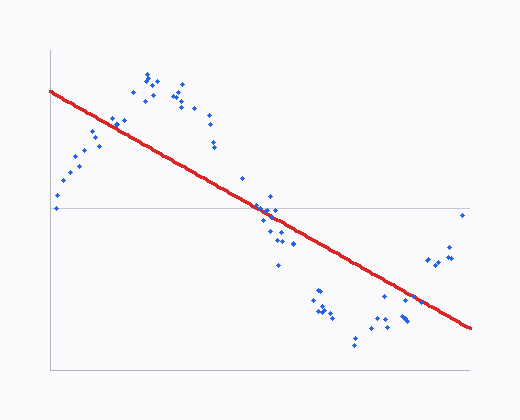
sin(2πx) — a linear model underfits the sinusoid; compare with RBF / GPR / SVR below.RLS tip. After OLS.fit(…, new OLS.Options(…, true)), stream new rows with model.update(tuple) or model.update(features, target) instead of refitting from scratch.
Ridge Regression
Ridge adds an L2 penalty λ‖β‖², shrinking coefficients toward zero (or a target beta0 in the generalized form). Use it under multicollinearity or when p approaches n. Fit with RidgeRegression.fit(formula, data, lambda) or Options(lambda) / Options(lambda, beta0).
Longley LOOCV RMSE with λ = 0.1 is about 1.732 in the unit tests. On the shared 1-D sinusoid, several λ values are plotted with OLS via compare1d — stronger shrinkage pulls the line toward a constant.
Hyperparameters are fields of the nested RidgeRegression.Options record. Pass an Options instance to fit, or a java.util.Properties map using the keys below (Options.toProperties() / Options.of(props) round-trip).
import smile.datasets.Longley
import smile.regression.RidgeRegression
import smile.validation.LOOCV

var longley = new Longley()
LOOCV.regression(longley.formula(), longley.data(),
    (f, data) -> RidgeRegression.fit(f, data, 0.1))
LOOCV RMSE ≈ 1.732 (Longley, λ=0.1)
import smile.datasets.Longley
import smile.regression._
import smile.validation.LOOCV

val longley = new Longley()
LOOCV.regression(longley.formula, longley.data,
  (f, data) => ridge(f, data, 0.1))
LOOCV RMSE ≈ 1.732 (Longley, λ=0.1)
import smile.datasets.Longley
import smile.regression.*
import smile.validation.LOOCV

val longley = Longley()
LOOCV.regression(longley.formula(), longley.data()) { f, data ->
    ridge(f, data, 0.1)
}
LOOCV RMSE ≈ 1.732 (Longley, λ=0.1)
// assumes generate1d / response1d / toFrame1d / compare1d from Datasets
import smile.data.formula.Formula
import smile.regression.DataFrameRegression
import smile.regression.OLS
import smile.regression.RidgeRegression

double[][] x = generate1d(80);
double[] y = response1d(x);
var df = toFrame1d(x, y);
var formula = Formula.lhs("y");
var ols = OLS.fit(formula, df);
double[] lambdas = {0.1, 1.0, 10.0, 100.0};
DataFrameRegression[] models = new DataFrameRegression[lambdas.length];
String[] labels = new String[lambdas.length];
for (int i = 0; i < lambdas.length; i++) {
    models[i] = RidgeRegression.fit(formula, df, lambdas[i]);
    labels[i] = "λ=" + lambdas[i];
}
compare1d(ols, models, labels, df, "x").show()
(opens plot: Ridge λ grid vs OLS)
import smile.data.formula.Formula
import smile.regression._

val x = generate1d(80); val y = response1d(x)
val df = toFrame1d(x, y)
val formula = Formula.lhs("y")
val ols = lm(formula, df)
val lambdas = Array(0.1, 1.0, 10.0, 100.0)
val models = lambdas.map(l => ridge(formula, df, l): DataFrameRegression)
val labels = lambdas.map(l => s"λ=$l")
compare1d(ols, models, labels, df, "x").show()
(opens plot: Ridge λ grid vs OLS)
import smile.data.formula.Formula
import smile.regression.*

val x = generate1d(80); val y = response1d(x)
val df = toFrame1d(x, y)
val formula = Formula.lhs("y")
val ols = lm(formula, df)
val lambdas = doubleArrayOf(0.1, 1.0, 10.0, 100.0)
val models = Array(lambdas.size) { i ->
    ridge(formula, df, lambdas[i]) as DataFrameRegression
}
val labels = Array(lambdas.size) { i -> "λ=${lambdas[i]}" }
compare1d(ols, models, labels, df, "x").show()
(opens plot: Ridge λ grid vs OLS)
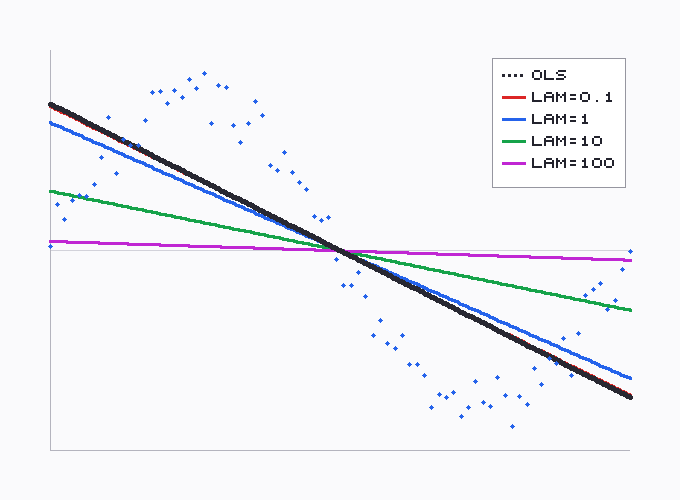
λ shrinks the slope toward zero relative to OLS.LASSO
LASSO adds an L1 penalty and yields sparse solutions (exact zeros). Solved by an interior-point / PCG method on the standardised design. Main knobs: lambda, tol, maxIter; advanced line-search / PCG fields are available for hard problems.
On one feature, larger λ shrinks the slope like Ridge; with many predictors it also zeros coefficients. The plot below sweeps several λ values on the same sinusoid used for OLS.
Hyperparameters are fields of the nested LASSO.Options record. Pass an Options instance to fit, or a java.util.Properties map using the keys below (Options.toProperties() / Options.of(props) round-trip). Focus on lambda, tol, and maxIter first.
import smile.datasets.Longley
import smile.regression.LASSO
import smile.validation.LOOCV

var longley = new Longley()
LOOCV.regression(longley.formula(), longley.data(),
    (f, data) -> LASSO.fit(f, data, new LASSO.Options(0.1)))
LOOCV RMSE ≈ 1.4149 (Longley, λ=0.1)
import smile.datasets.Longley
import smile.regression._
import smile.validation.LOOCV

val longley = new Longley()
LOOCV.regression(longley.formula, longley.data,
  (f, data) => lasso(f, data, 0.1))
LOOCV RMSE ≈ 1.4149 (Longley, λ=0.1)
import smile.datasets.Longley
import smile.regression.*
import smile.validation.LOOCV

val longley = Longley()
LOOCV.regression(longley.formula(), longley.data()) { f, data ->
    lasso(f, data, 0.1)
}
LOOCV RMSE ≈ 1.4149 (Longley, λ=0.1)
// assumes generate1d / response1d / toFrame1d / compare1d from Datasets
import smile.data.formula.Formula
import smile.regression.DataFrameRegression
import smile.regression.LASSO
import smile.regression.OLS

double[][] x = generate1d(80);
double[] y = response1d(x);
var df = toFrame1d(x, y);
var formula = Formula.lhs("y");
var ols = OLS.fit(formula, df);
double[] lambdas = {0.01, 0.1, 0.5, 1.0};
DataFrameRegression[] models = new DataFrameRegression[lambdas.length];
String[] labels = new String[lambdas.length];
for (int i = 0; i < lambdas.length; i++) {
    models[i] = LASSO.fit(formula, df, new LASSO.Options(lambdas[i]));
    labels[i] = "λ=" + lambdas[i];
}
compare1d(ols, models, labels, df, "x").show()
(opens plot: LASSO λ grid vs OLS)
import smile.data.formula.Formula
import smile.regression._

val x = generate1d(80); val y = response1d(x)
val df = toFrame1d(x, y)
val formula = Formula.lhs("y")
val ols = lm(formula, df)
val lambdas = Array(0.01, 0.1, 0.5, 1.0)
val models = lambdas.map(l => lasso(formula, df, l): DataFrameRegression)
val labels = lambdas.map(l => s"λ=$l")
compare1d(ols, models, labels, df, "x").show()
(opens plot: LASSO λ grid vs OLS)
import smile.data.formula.Formula
import smile.regression.*

val x = generate1d(80); val y = response1d(x)
val df = toFrame1d(x, y)
val formula = Formula.lhs("y")
val ols = lm(formula, df)
val lambdas = doubleArrayOf(0.01, 0.1, 0.5, 1.0)
val models = Array(lambdas.size) { i ->
    lasso(formula, df, lambdas[i]) as DataFrameRegression
}
val labels = Array(lambdas.size) { i -> "λ=${lambdas[i]}" }
compare1d(ols, models, labels, df, "x").show()
(opens plot: LASSO λ grid vs OLS)
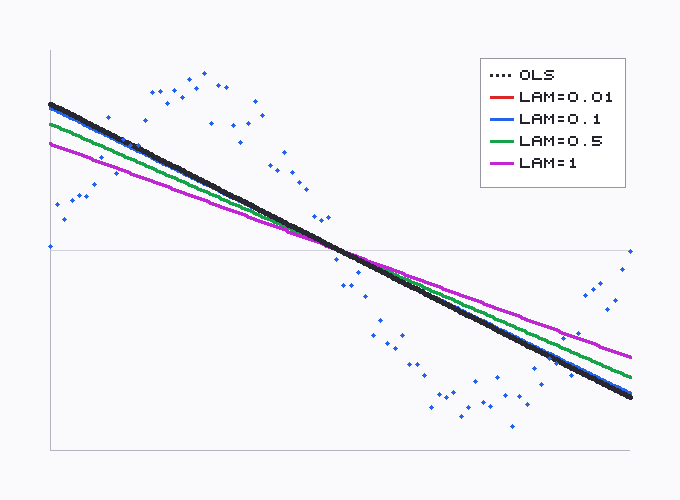
λ flattens the line; strong L1 can drive the slope to (near) zero.Elastic Net
Elastic Net combines L1 and L2 penalties (lambda1, lambda2), bridging LASSO and Ridge. Use it when predictors are correlated and you still want some sparsity. Same IPM solver family as LASSO.
The one-feature plot below sweeps several (λ₁, λ₂) pairs on the same sinusoid used for OLS.
Hyperparameters are fields of the nested ElasticNet.Options record. Pass an Options instance to fit, or a java.util.Properties map using the keys below (Options.toProperties() / Options.of(props) round-trip). Advanced fields mirror LASSO (alpha, beta, eta, line-search / PCG caps).
import smile.datasets.Longley
import smile.regression.ElasticNet
import smile.validation.LOOCV

var longley = new Longley()
LOOCV.regression(longley.formula(), longley.data(),
    (f, data) -> ElasticNet.fit(f, data, 0.1, 0.1))
LOOCV RMSE ≈ 1.7401 (Longley, λ1=λ2=0.1)
import smile.datasets.Longley
import smile.regression.ElasticNet
import smile.validation.LOOCV

val longley = new Longley()
LOOCV.regression(longley.formula, longley.data,
  (f, data) => ElasticNet.fit(f, data, 0.1, 0.1))
LOOCV RMSE ≈ 1.7401 (Longley, λ1=λ2=0.1)
import smile.datasets.Longley
import smile.regression.ElasticNet
import smile.validation.LOOCV

val longley = Longley()
LOOCV.regression(longley.formula(), longley.data()) { f, data ->
    ElasticNet.fit(f, data, 0.1, 0.1)
}
LOOCV RMSE ≈ 1.7401 (Longley, λ1=λ2=0.1)
// assumes generate1d / response1d / toFrame1d / compare1d from Datasets
import smile.data.formula.Formula
import smile.regression.DataFrameRegression
import smile.regression.ElasticNet
import smile.regression.OLS

double[][] x = generate1d(80);
double[] y = response1d(x);
var df = toFrame1d(x, y);
var formula = Formula.lhs("y");
var ols = OLS.fit(formula, df);
double[] l1 = {0.1, 0.3, 1.0, 0.1};
double[] l2 = {0.1, 0.3, 0.1, 1.0};
DataFrameRegression[] models = new DataFrameRegression[l1.length];
String[] labels = new String[l1.length];
for (int i = 0; i < l1.length; i++) {
    models[i] = ElasticNet.fit(formula, df, l1[i], l2[i]);
    labels[i] = "λ1=" + l1[i] + ", λ2=" + l2[i];
}
compare1d(ols, models, labels, df, "x").show()
(opens plot: Elastic Net grid vs OLS)
import smile.data.formula.Formula
import smile.regression.{DataFrameRegression, ElasticNet, OLS}

val x = generate1d(80); val y = response1d(x)
val df = toFrame1d(x, y)
val formula = Formula.lhs("y")
val ols = OLS.fit(formula, df)
val lambdas = Array((0.1, 0.1), (0.3, 0.3), (1.0, 0.1), (0.1, 1.0))
val models = lambdas.map { case (l1, l2) =>
  ElasticNet.fit(formula, df, l1, l2): DataFrameRegression
}
val labels = lambdas.map { case (l1, l2) => s"λ1=$l1, λ2=$l2" }
compare1d(ols, models, labels, df, "x").show()
(opens plot: Elastic Net grid vs OLS)
import smile.data.formula.Formula
import smile.regression.DataFrameRegression
import smile.regression.ElasticNet
import smile.regression.OLS

val x = generate1d(80); val y = response1d(x)
val df = toFrame1d(x, y)
val formula = Formula.lhs("y")
val ols = OLS.fit(formula, df)
val lambdas = arrayOf(0.1 to 0.1, 0.3 to 0.3, 1.0 to 0.1, 0.1 to 1.0)
val models = Array(lambdas.size) { i ->
    val (l1, l2) = lambdas[i]
    ElasticNet.fit(formula, df, l1, l2) as DataFrameRegression
}
val labels = Array(lambdas.size) { i ->
    val (l1, l2) = lambdas[i]
    "λ1=$l1, λ2=$l2"
}
compare1d(ols, models, labels, df, "x").show()
(opens plot: Elastic Net grid vs OLS)
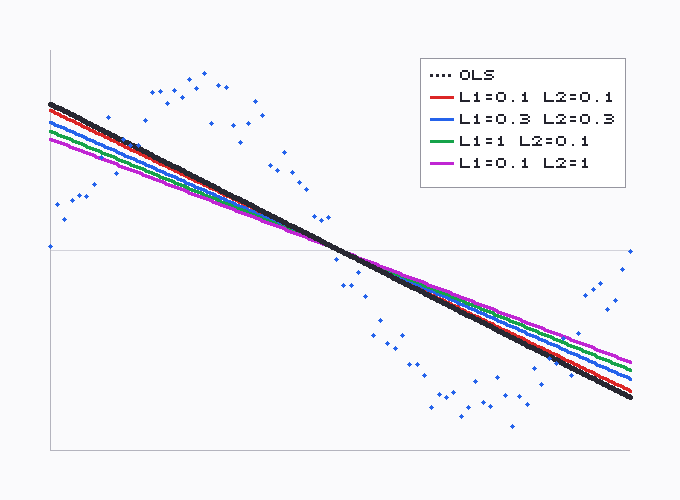
λ₁ / λ₂ shrinks the slope; the mix sits between pure L1 and L2 effects.Generalized Linear Models
GLM extends linear models with exponential-family responses and link functions (package smile.regression.glm). Fit with GLM.fit(formula, data, family). Keep the model family explicit — Gaussian identity recovers OLS-like regression; Bernoulli logit is for binary outcomes.
Hyperparameters are fields of the nested GLM.Options record. Pass an Options instance to fit, or a java.util.Properties map using the keys below (Options.toProperties() / Options.of(props) round-trip).
| Family | Typical link | Use |
|---|---|---|
Gaussian.identity() | identity | Continuous response (classical linear model). |
Bernoulli.logit() | logit | Binary 0/1 outcomes (e.g. Default). |
Binomial.logit(n) | logit | Grouped binary counts. |
Poisson.log() | log | Count data. |
import smile.datasets.Default
import smile.regression.GLM
import smile.regression.glm.Bernoulli

var credit = new Default()
GLM model = GLM.fit(credit.formula(), credit.data(), Bernoulli.logit())
model.deviance()
import smile.datasets.Default
import smile.regression.GLM
import smile.regression.glm.Bernoulli
val credit = new Default()
val model = GLM.fit(credit.formula, credit.data, Bernoulli.logit())
model.devianceimport smile.datasets.Default
import smile.regression.GLM
import smile.regression.glm.Bernoulli
val credit = Default()
val model = GLM.fit(credit.formula(), credit.data(), Bernoulli.logit())
model.deviance()Generalized Additive Models
GAM fits smooth functions of predictors (smoothing / B-splines) inside a GLM-style framework. Pass family + GAM.Options; numeric predictors become smooths automatically under the formula.
Hyperparameters are fields of the nested GAM.Options record. Pass an Options instance to fit, or a java.util.Properties map using the keys below (Options.toProperties() / Options.of(props) round-trip).
import smile.datasets.ProstateCancer
import smile.regression.GAM
import smile.regression.glm.Gaussian

var prostate = new ProstateCancer()
GAM.Options options = new GAM.Options(0.6, null, 10, 3, 1E-6, 50, 30, 1E-7)
GAM model = GAM.fit(prostate.formula(), prostate.train(),
    Gaussian.identity(), options)
model.totalEdf()
import smile.datasets.ProstateCancer
import smile.regression.GAM
import smile.regression.glm.Gaussian
val prostate = new ProstateCancer()
val options = new GAM.Options(0.6, null, 10, 3, 1E-6, 50, 30, 1E-7)
val model = GAM.fit(prostate.formula, prostate.train,
Gaussian.identity(), options)
model.totalEdfimport smile.datasets.ProstateCancer
import smile.regression.GAM
import smile.regression.glm.Gaussian
val prostate = ProstateCancer()
val options = GAM.Options(0.6, null, 10, 3, 1E-6, 50, 30, 1E-7)
val model = GAM.fit(prostate.formula(), prostate.train(),
Gaussian.identity(), options)
model.totalEdf()RBF Network
Radial basis function networks approximate the response as a linear combination of RBFs (often Gaussians centred by k-means). Fit with RBFNetwork.fit(x, y, RBF.fit(x, k)) or the Kotlin/Scala rbfnet(x, y, k) helper. Scale features; Longley LOOCV RMSE with 10 centres is about 5.09.
RBFNetwork is configured primarily through java.util.Properties (or setters on the trained network). Keys used by fit(…, Properties) / setParameters: Or pass an explicit RBF[] from RBF.fit.
// assumes generate1d / response1d / visualize1d
import smile.model.rbf.RBF
import smile.regression.RBFNetwork

double[][] x = generate1d(80);
double[] y = response1d(x);
var model = RBFNetwork.fit(x, y, RBF.fit(x, 10));
visualize1d(model, x, y).show()
(opens plot: RBF 1-D fit)
import smile.regression._

val x = generate1d(80); val y = response1d(x)
val model = rbfnet(x, y, 10)
visualize1d(model, x, y).show()
(opens plot: RBF 1-D fit)
import smile.regression.*

val x = generate1d(80); val y = response1d(x)
val model = rbfnet(x, y, 10)
visualize1d(model, x, y).show()
(opens plot: RBF 1-D fit)
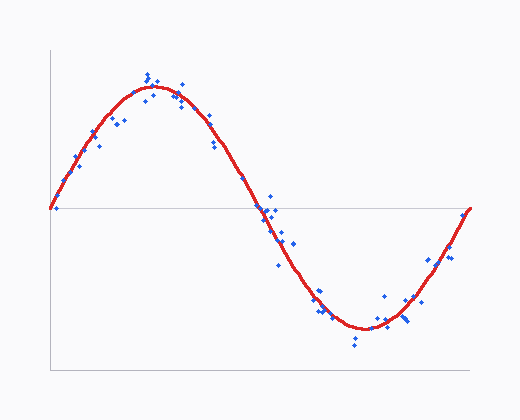
sin(2πx).double[][] x = generate2d(400);
double[] y = response2d(x);
var model = RBFNetwork.fit(x, y, RBF.fit(x, 20));
visualize2d(model, x, y).show()
(opens plot: RBF 2-D heatmap)
val x = generate2d(400); val y = response2d(x)
val model = rbfnet(x, y, 20)
visualize2d(model, x, y).show()
(opens plot: RBF 2-D heatmap)
val x = generate2d(400); val y = response2d(x)
val model = rbfnet(x, y, 20)
visualize2d(model, x, y).show()
(opens plot: RBF 2-D heatmap)
Support Vector Regression (ε-SVR)
ε-SVR ignores residuals inside an ε-tube and penalises outliers with soft-margin parameter C. Kernel fits return KernelMachine; linear fits return LinearSVM (see next section). Scale inputs before using RBF / Gaussian kernels.
Hyperparameters are fields of the nested SVM.Options record. Pass an Options instance to fit, or a java.util.Properties map using the keys below (Options.toProperties() / Options.of(props) round-trip).
import smile.math.kernel.GaussianKernel
import smile.regression.SVM

double[][] x = generate1d(80);
double[] y = response1d(x);
var model = SVM.fit(x, y, new GaussianKernel(0.5),
    new SVM.Options(0.1, 5.0, 1E-3));
visualize1d(model, x, y).show()
(opens plot: ε-SVR 1-D fit)
import smile.math.kernel.GaussianKernel
import smile.regression._

val x = generate1d(80); val y = response1d(x)
val model = svm(x, y, new GaussianKernel(0.5), 0.1, 5.0)
visualize1d(model, x, y).show()
(opens plot: ε-SVR 1-D fit)
import smile.math.kernel.GaussianKernel
import smile.regression.*

val x = generate1d(80); val y = response1d(x)
val model = svm(x, y, GaussianKernel(0.5), 0.1, 5.0)
visualize1d(model, x, y).show()
(opens plot: ε-SVR 1-D fit)
double[][] x = generate2d(300);
double[] y = response2d(x);
var model = SVM.fit(x, y, new GaussianKernel(0.5),
    new SVM.Options(0.1, 5.0));
visualize2d(model, x, y).show()
(opens plot: SVR 2-D heatmap)
val x = generate2d(300); val y = response2d(x)
val model = svm(x, y, new GaussianKernel(0.5), 0.1, 5.0)
visualize2d(model, x, y).show()
(opens plot: SVR 2-D heatmap)
val x = generate2d(300); val y = response2d(x)
val model = svm(x, y, GaussianKernel(0.5), 0.1, 5.0)
visualize2d(model, x, y).show()
(opens plot: SVR 2-D heatmap)
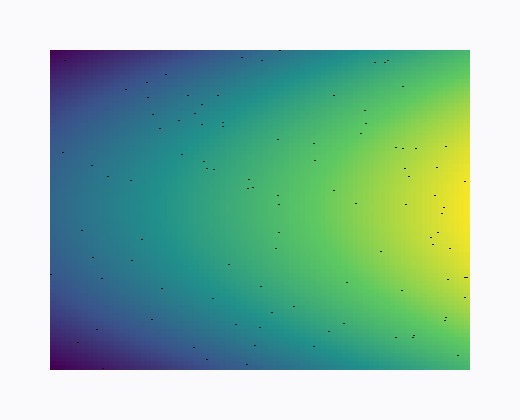
y = x₀ − x₁².Linear SVM
SVM.fit(x, y, options) (no kernel) returns a LinearSVM — efficient for high-dimensional linear problems. Sparse counterparts SparseLinearSVM and BinarySparseLinearSVM accept SparseArray[] / int[][] inputs.
Smaller soft-margin C regularises more strongly. The plot below sweeps several C values (fixed ε) against OLS on the shared sinusoid.
import smile.regression.LinearSVM
import smile.regression.SVM

LinearSVM model = (LinearSVM) SVM.fit(x, y, new SVM.Options(0.1, 1.0));
double[] w = model.weights();
double b = model.intercept();
double yhat = model.predict(sample);

// SparseLinearSVM.fit(sparseX, y, p, options)
// BinarySparseLinearSVM.fit(intX, y, p, options)
import smile.regression.{LinearSVM, SVM}
val model = SVM.fit(x, y, new SVM.Options(0.1, 1.0)).asInstanceOf[LinearSVM]
val w = model.weights
val b = model.intercept
val yhat = model.predict(sample)import smile.regression.LinearSVM
import smile.regression.SVM
val model = SVM.fit(x, y, SVM.Options(0.1, 1.0)) as LinearSVM
val w = model.weights()
val b = model.intercept()
val yhat = model.predict(sample)// assumes generate1d / response1d / toFrame1d / compare1d from Datasets
import smile.data.DataFrame
import smile.data.formula.Formula
import smile.regression.OLS
import smile.regression.Regression
import smile.regression.SVM
double[][] x = generate1d(80);
double[] y = response1d(x);
var ols = OLS.fit(Formula.lhs("y"), toFrame1d(x, y));
Regression<double[]> olsArr = v -> ols.predict(DataFrame.of(new double[][]{v}, "x"))[0];
double[] Cs = {0.1, 1.0, 10.0, 100.0};
@SuppressWarnings("unchecked")
Regression<double[]>[] models = new Regression[Cs.length];
String[] labels = new String[Cs.length];
for (int i = 0; i < Cs.length; i++) {
models[i] = SVM.fit(x, y, new SVM.Options(0.1, Cs[i]));
labels[i] = "C=" + Cs[i];
}
compare1d(olsArr, models, labels, x, y).show()
(opens plot: Linear SVM C grid vs OLS)
import smile.data.DataFrame
import smile.data.formula.Formula
import smile.regression.{OLS, Regression, SVM}

val x = generate1d(80); val y = response1d(x)
val ols = OLS.fit(Formula.lhs("y"), toFrame1d(x, y))
val olsArr = new Regression[Array[Double]] {
  def predict(v: Array[Double]): Double =
    ols.predict(DataFrame.of(Array(v), "x")).head
}
val Cs = Array(0.1, 1.0, 10.0, 100.0)
val models = Cs.map(c => SVM.fit(x, y, new SVM.Options(0.1, c)))
val labels = Cs.map(c => s"C=$c")
compare1d(olsArr, models, labels, x, y).show()
(opens plot: Linear SVM C grid vs OLS)
import smile.data.DataFrame
import smile.data.formula.Formula
import smile.regression.OLS
import smile.regression.Regression
import smile.regression.SVM

val x = generate1d(80); val y = response1d(x)
val ols = OLS.fit(Formula.lhs("y"), toFrame1d(x, y))
val olsArr = object : Regression<DoubleArray> {
    override fun predict(v: DoubleArray): Double =
        ols.predict(DataFrame.of(arrayOf(v), "x"))[0]
}
val Cs = doubleArrayOf(0.1, 1.0, 10.0, 100.0)
@Suppress("UNCHECKED_CAST")
val models = Array(Cs.size) { i ->
    SVM.fit(x, y, SVM.Options(0.1, Cs[i]))
} as Array<Regression<DoubleArray>>
val labels = Array(Cs.size) { i -> "C=${Cs[i]}" }
compare1d(olsArr, models, labels, x, y).show()
(opens plot: Linear SVM C grid vs OLS)
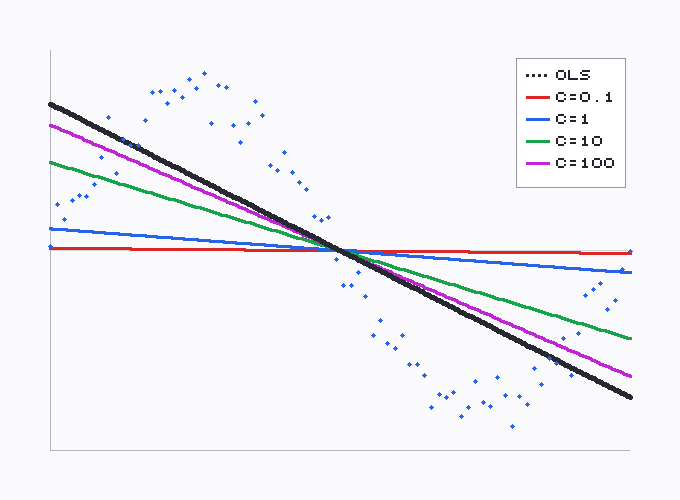
C regularizes more, pulling the fit flatter than OLS.Gaussian Process Regression
GPR places a Gaussian-process prior over functions and returns mean predictions (with optional predictive variance on the model object). Exact inference is O(n³) — fine for hundreds of points; for large n use subset-of-regressors or Nystrom approximations (GaussianProcessRegression.fit(x, y, inducing, …) / nystrom, Scala/Kotlin gpr.approx / gpr.nystrom).
Hyperparameters are fields of the nested GaussianProcessRegression.Options record. Pass an Options instance to fit, or a java.util.Properties map using the keys below (Options.toProperties() / Options.of(props) round-trip).
import smile.math.kernel.GaussianKernel
import smile.regression.GaussianProcessRegression

double[][] x = generate1d(40);
double[] y = response1d(x);
var model = GaussianProcessRegression.fit(x, y,
    new GaussianKernel(0.2), new GaussianProcessRegression.Options(0.01));
visualize1d(model, x, y).show()
(opens plot: GPR 1-D fit)
import smile.math.kernel.GaussianKernel
import smile.regression._

val x = generate1d(40); val y = response1d(x)
val model = gpr(x, y, new GaussianKernel(0.2), 0.01)
visualize1d(model, x, y).show()
(opens plot: GPR 1-D fit)
import smile.math.kernel.GaussianKernel
import smile.regression.*

val x = generate1d(40); val y = response1d(x)
val model = gpr(x, y, GaussianKernel(0.2), 0.01)
visualize1d(model, x, y).show()
(opens plot: GPR 1-D fit)
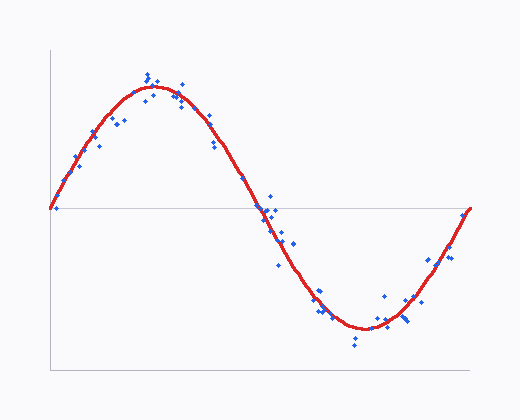
Multilayer Perceptron
A fully connected feed-forward net for regression, trained by mini-batch SGD. Build layers with Layer.input / hidden activations / Layer.mse(1, OutputFunction.LINEAR), then update for epochs — or use MLP.fit(x, y, Properties) with smile.mlp.layers like "ReLU(100)". Scale inputs; online() is true.
MLP is configured primarily through java.util.Properties (or setters on the trained network). Keys used by fit(…, Properties) / setParameters:
import java.util.Properties
import smile.regression.MLP

Properties props = new Properties()
props.setProperty("smile.mlp.layers", "ReLU(50)")
props.setProperty("smile.mlp.epochs", "50")
props.setProperty("smile.mlp.learning_rate", "0.01")
MLP model = MLP.fit(x, y, props)
import java.util.Properties
import smile.regression.MLP
val props = new Properties()
props.setProperty("smile.mlp.layers", "ReLU(50)")
props.setProperty("smile.mlp.epochs", "50")
props.setProperty("smile.mlp.learning_rate", "0.01")
val model = MLP.fit(x, y, props)import java.util.Properties
import smile.regression.MLP
val props = Properties()
props.setProperty("smile.mlp.layers", "ReLU(50)")
props.setProperty("smile.mlp.epochs", "50")
props.setProperty("smile.mlp.learning_rate", "0.01")
val model = MLP.fit(x, y, props)Regression Tree
CART-style regression trees partition the feature space and predict a constant in each leaf. Fast and interpretable, but high variance — prefer forests or boosting for accuracy. Fit with a Formula on mixed tabular data.
Hyperparameters are fields of the nested RegressionTree.Options record. Pass an Options instance to fit, or a java.util.Properties map using the keys below (Options.toProperties() / Options.of(props) round-trip).
import smile.regression.RegressionTree

double[][] x = generate2d(400);
double[] y = response2d(x);
var df = toFrame2d(x, y);
RegressionTree model = RegressionTree.fit(Formula.lhs("y"), df,
    new RegressionTree.Options(6, 0, 5));
visualize2d(model, df, "x1", "x2").show()
(opens plot: tree 2-D partition)
import smile.regression._

val x = generate2d(400); val y = response2d(x)
val df = toFrame2d(x, y)
val model = cart(Formula.lhs("y"), df, maxDepth = 6)
visualize2d(model, df, "x1", "x2").show()
(opens plot: tree 2-D partition)
import smile.regression.*

val x = generate2d(400); val y = response2d(x)
val df = toFrame2d(x, y)
val model = cart(Formula.lhs("y"), df, maxDepth = 6)
visualize2d(model, df, "x1", "x2").show()
(opens plot: tree 2-D partition)
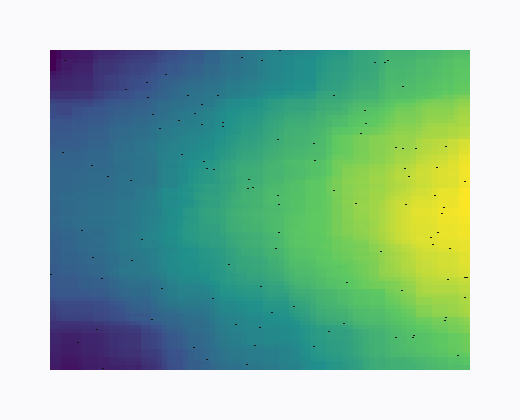
y = x₀ − x₁².import smile.datasets.Abalone
import smile.regression.RegressionTree
import smile.validation.metric.RMSE
var abalone = new Abalone()
var model = RegressionTree.fit(abalone.formula(), abalone.train())
RMSE.of(abalone.testy(), model.predict(abalone.test()))import smile.datasets.Abalone
import smile.regression._
import smile.validation.metric.RMSE
val abalone = new Abalone()
val model = cart(abalone.formula, abalone.train)
RMSE.of(abalone.testy, model.predict(abalone.test))import smile.datasets.Abalone
import smile.regression.*
import smile.validation.metric.RMSE
val abalone = Abalone()
val model = cart(abalone.formula(), abalone.train())
RMSE.of(abalone.testy(), model.predict(abalone.test()))Random Forest
Bagged regression trees with random feature subsets at each split. Strong default for mixed tabular data with free OOB error estimates. Abalone training RMSE via the OOB-style test helper is about 2.18; hold-out test RMSE with 100 trees is about 2.07 in the unit tests.
Hyperparameters are fields of the nested RandomForest.Options record. Pass an Options instance to fit, or a java.util.Properties map using the keys below (Options.toProperties() / Options.of(props) round-trip).
import smile.datasets.Abalone
import smile.math.MathEx
import smile.regression.RandomForest
import smile.validation.metric.RMSE

MathEx.setSeed(19650218)
var abalone = new Abalone()
var model = RandomForest.fit(abalone.formula(), abalone.train(),
    new RandomForest.Options(100))
RMSE.of(abalone.testy(), model.predict(abalone.test()))
test RMSE ≈ 2.0749 (100 trees, seeded)
import smile.datasets.Abalone
import smile.math.MathEx
import smile.regression._
import smile.validation.metric.RMSE

MathEx.setSeed(19650218)
val abalone = new Abalone()
val model = randomForest(abalone.formula, abalone.train, ntrees = 100)
RMSE.of(abalone.testy, model.predict(abalone.test))
test RMSE ≈ 2.0749 (100 trees, seeded)
import smile.datasets.Abalone
import smile.math.MathEx
import smile.regression.*
import smile.validation.metric.RMSE

MathEx.setSeed(19650218)
val abalone = Abalone()
val model = randomForest(abalone.formula(), abalone.train(), ntrees = 100)
RMSE.of(abalone.testy(), model.predict(abalone.test()))
test RMSE ≈ 2.0749 (100 trees, seeded)
double[][] x = generate1d(80);
double[] y = response1d(x);
var df = toFrame1d(x, y);
var model = RandomForest.fit(Formula.lhs("y"), df,
    new RandomForest.Options(100));
visualize1d(model, df, "x").show()
(opens plot: RF 1-D fit)
val x = generate1d(80); val y = response1d(x)
val df = toFrame1d(x, y)
val model = randomForest(Formula.lhs("y"), df, ntrees = 100)
visualize1d(model, df, "x").show()
(opens plot: RF 1-D fit)
val x = generate1d(80); val y = response1d(x)
val df = toFrame1d(x, y)
val model = randomForest(Formula.lhs("y"), df, ntrees = 100)
visualize1d(model, df, "x").show()
(opens plot: RF 1-D fit)
Gradient Tree Boost
Gradient boosting fits regression trees to pseudo-residuals under a chosen loss (LAD by default for robustness; also least squares, Huber, quantile). Shrinkage trades off against tree count. Often the strongest tabular accuracy after tuning. Abalone test RMSE is typically around 2.2–2.3 depending on loss.
Hyperparameters are fields of the nested GradientTreeBoost.Options record. Pass an Options instance to fit, or a java.util.Properties map using the keys below (Options.toProperties() / Options.of(props) round-trip).
import smile.datasets.Abalone
import smile.math.MathEx
import smile.model.cart.Loss
import smile.regression.GradientTreeBoost
import smile.validation.metric.RMSE

MathEx.setSeed(19650218)
var abalone = new Abalone()
var options = new GradientTreeBoost.Options(Loss.ls(), 100)
GradientTreeBoost model = GradientTreeBoost.fit(
    abalone.formula(), abalone.train(), options)
RMSE.of(abalone.testy(), model.predict(abalone.test()))
test RMSE ≈ 2.20 (Abalone, LS loss, 100 trees)
import smile.datasets.Abalone
import smile.math.MathEx
import smile.model.cart.Loss
import smile.regression._
import smile.validation.metric.RMSE

MathEx.setSeed(19650218)
val abalone = new Abalone()
val model = gbm(abalone.formula, abalone.train,
  loss = Loss.ls(), ntrees = 100)
RMSE.of(abalone.testy, model.predict(abalone.test))
test RMSE ≈ 2.20 (Abalone, LS loss, 100 trees)
import smile.datasets.Abalone
import smile.math.MathEx
import smile.model.cart.Loss
import smile.regression.*
import smile.validation.metric.RMSE

MathEx.setSeed(19650218)
val abalone = Abalone()
val model = gbm(abalone.formula(), abalone.train(),
    loss = Loss.ls(), ntrees = 100)
RMSE.of(abalone.testy(), model.predict(abalone.test()))
test RMSE ≈ 2.20 (Abalone, LS loss, 100 trees)
Practical Tips
- Probe online learning. Call
online()(notisOnline()) beforeupdate. - Scale-sensitive models. Normalize for Ridge / LASSO / ElasticNet diagnostics fairness, SVR, RBF, GPR, and MLP. Trees are scale-invariant.
- Formula vs arrays. Use
Formula+DataFramefor mixed / categorical tabular data (trees, ensembles, OLS family); usedouble[][]for numeric matrices and kernel / neural methods. - Validation. Prefer
CrossValidation.regressionorLOOCV.regressionwithRMSE/R2; seed withMathEx.setSeed(…)for reproducible ensembles and folds. - Serialize.
Write.object(model, path)/Read.object(path). - Properties configs. Prefer nested
Optionswhen coding; use the property keys listed under each algorithm (underscores, e.g.smile.random_forest.trees) for configuration files. Round-trip withtoProperties()/Options.of(props). - Large
n. Prefer tree ensembles; exact GPR and kernel SVR scale poorly — use approximations or linear SVR. - RLS. Keep
OLS.Options.recursiveenabled when you need streaming coefficient updates.